|
|
|
|
|
|
Node locked licensing
Application Note AP607
|
|
Installing Polar node locked software The node locked versions of Polar software look for a license file on the machine containing the software. The license file is based on the machine's ethernet address or, if a hardware key is purchased, on the serial number of the key (etched on the body of the key). Installing the software To install Polar node-locked software follow the steps below:
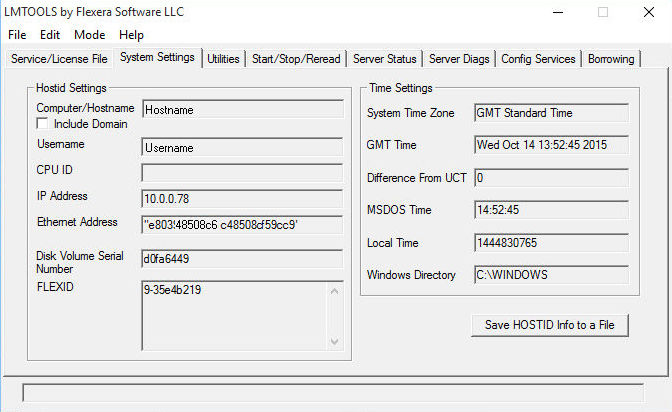
Note: At installation Microsoft Windows 64-bit versions create two program files folders, \Program Files and \Program Files (x86). 64-bit Windows redirects the \Program Files folder for all programs that are 32-bit during the installation to the \Program Files (x86) folder. 64-bit programs are installed into the \Program Files folder. When installing on a 64-bit Windows operating system, therefore, Polar software (for example Si8000m, Si9000e, Speedstack, CGen) installs in the Program Files (x86)\Polar folder so the license will be located by default in Program Files (x86)\Polar\Licences. The folder will also contain the LMTOOLS utility program for license installation and management. Installing the key drivers (parallel / USB Key users only) If a hardware key has been purchased please follow the download/installation instructions in Application Note AP620. If you have a new installation and do not yet have a valid .lic file for your key – please read on: Generating the license file To generate the license file it will be necessary to gather information that uniquely identifies your system. Use Windows Explorer to browse to the C:\Program Files (x86)\Polar\Licences folder and run lmtools.exe. From within LMTOOLS select System Settings. The System Settings page contains the ethernet addresses to which the license file will be locked.
Save this information by selecting the Save HOSTID Info to a File. Enter a filename, choose a suitable folder location and select Save. The LMTOOLS utility may now be closed. Email the HOSTID file created to polarcare@polarinstruments.com The license file will be returned to you shortly. Installing the license file Once you have received the license file please complete the installation procedure below. We recommend that you place the license file into the Licences folder as the software looks there first for its license. Use Windows Explorer to copy the license file to this location. Start the program (via the Windows Start menu or using the icon on the Windows desktop). During start up the software searches its default license location for its license file. If a license is not found (for example if the license file is located in a different folder) the License Finder will prompt for a License File / Server location. Ensure that “Specify the License File” is selected and select Next to continue. The License Finder prompts for the license file name. Enter the path/filename or click the Browse button to navigate to the file. (Using the Choose License File Dialog, browse to C:\Program Files (x86)\Polar\Licences or the folder containing the license and select the license file.) Select Open. The License Finder will display the license file specified. Select Next to continue. The License Finder should display its completion message. Click Finish. The software may display a message to indicate how many days are remaining before the license expires. Select OK to continue. |