|
|
|
|
|
|
Updating a custom SiExcelExpert-linked spreadsheet
Application Note AP8211
|
|
|
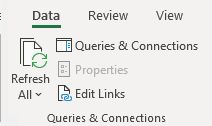
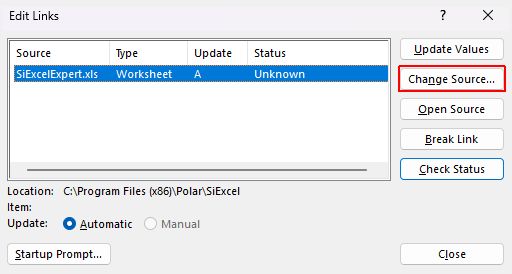
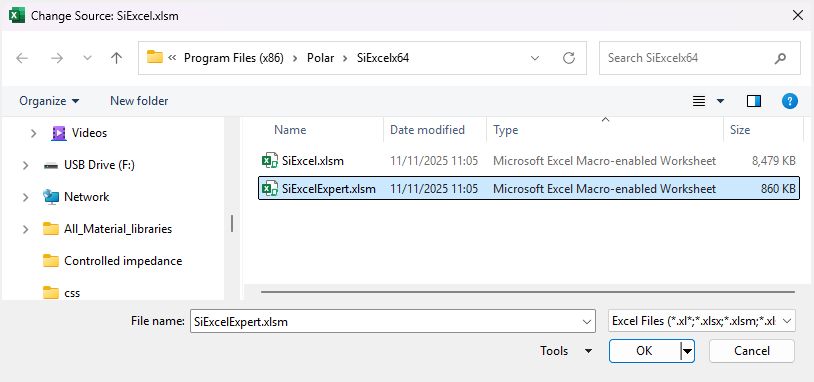
IMPORTANT NOTE Polar strongly recommend that when using the Excel User Defined Structure Functions that these remain linked to the Polar workbooks SiExcel / SiExcelExpert. As Polar issues SiExcel software updates it only then necessitates to upgrade the installed Polar software and all remaining linked workbooks will not then need to be upgraded individually.SiExcel 2601 and above: Updating a custom SiExcelExpert-linked spreadsheet (from legacy SiExcel v21.04 and below and legacy SiExcel x64 v24.01 and below) The Field Solver functions for the Si8000m/Si9000e controlled impedance structures are built into the Microsoft Excel workbook SiExcelExpert.xlsm as user-defined functions. This allows rapid and convenient analysis of board trace characteristics such as impedance, propagation delay, inductance and capacitance against several varying board parameters. To update a custom Excel worksheet that uses a version of SiExcel prior to v26.01.01 and contains links for the structures to the SiExcelExpert spreadsheet, follow the steps below:
|
|